



Smart Releases in SAP
SiLI Smart Releases
Go beyond a green or red button. Timeliness and quality of information in the palm of your hand, for better decisions on approval of requisitions, orders, contracts and service entry sheets. From budget analysis, historical pricing, purchasing cycle, supplier status to risk alerts.
What is SiLI?
SiLI is Innova's application for approving SAP purchasing documents (requisitions, purchase orders, contracts, service entry sheets) from a mobile device, with valuable decision-making information: available budget, price and consumption history, and alerts. It removes bottlenecks caused by absent signers and blind approvals.
+150 companies · +12 years in SAP · SAP PartnerEdge · 4–8 week implementation · No per-user fees
Main functions
Business information
Better purchasing decisions require relevant information:
- Historical price analysis.
- Analysis of material consumption and purchasing cycle.
- Document change history.
- Budget analysis.
- Risk alerts.
- Stock coverage analysis.
Communication management
The approver can make inquiries to other users, and get answers through the App before deciding on approval or rejection of documents.
All communication is recorded in the document history.
Reports
Easily identifies, without the need to access configuration.
Check the documents you released and you can even reverse your approvals or rejections in case of errors.
Identifies documents without release strategies, which could represent vulnerabilities in the financial delegation.
Notifications via mail
It has the possibility of “push” notifications via email, receiving an email that summarizes all the relevant information, in a friendly html format, and with the possibility of approving or rejecting directly in the email.
Settings
SiLI is fully customizable, you can adjust the fields you want to display, alert messages relevant to your role in the company, enable or disable email notifications, and even what information you want in the emails.
Why SiLI Smart Releases instead My Inbox SAP Fiori App?
Download our article and learn why you should use SiLI Smart Releases instead of My Inbox SAP Fiori
Schedule your DEMO
Easy to know.
In 30 – 45 minutes we present you our solutions, online.
So you can see in detail how your processes will be optimized in SAP.

Benefits
Learn about the advantages of implementing our apps
For the IT department
Easy to implement
You just need to import the installers and transport them to each client, like any other change in SAP and deploy the front-end component according to your convenience (SaaS, on client web server, Fiori, SAP BTP).
Secure
With the SAP standard authorization objects and some of the App’s own authorization objects, it is ensured that control and segregation of duties is maintained by means of SAP standard user and role management.
No maintenance or support
With the Warranty, Support and Upgrades service, Innova is responsible for maintaining compatibility with the latest versions of the system, as well as support and clarification of doubts with users.
For the entire company
Audit tools
The financial delegation corresponds to an important aspect in the company, therefore SiLI supports you with reports to audit the release strategies or analyze documents that have been generated without approval processes.
Consolidation of information
All the information required by approvers to make better purchasing decisions.
Decision Timeliness
By being able to approve from any phone or tablet, purchasing processes are not stopped by an out-of-office manager.
Use cases
Common SAP problems solved by SiLI
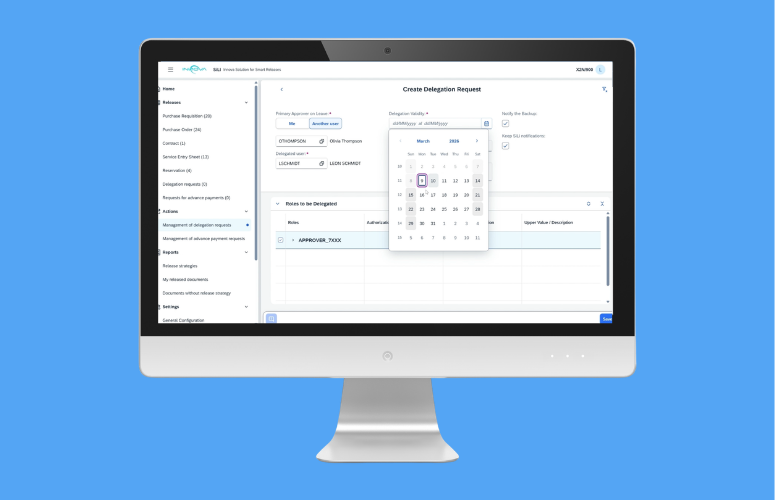
Management and approval of delegation requests
Management and approval of delegation requests SiLI USE CASE In standard SAP, the delegation of approvals often requires technical adjustments in roles and authorizations, usually managed by IT or Basis. This results in slow response times, dependency on technical resources and operational risks when absences are not planned sufficiently in advance. This causes that for […]
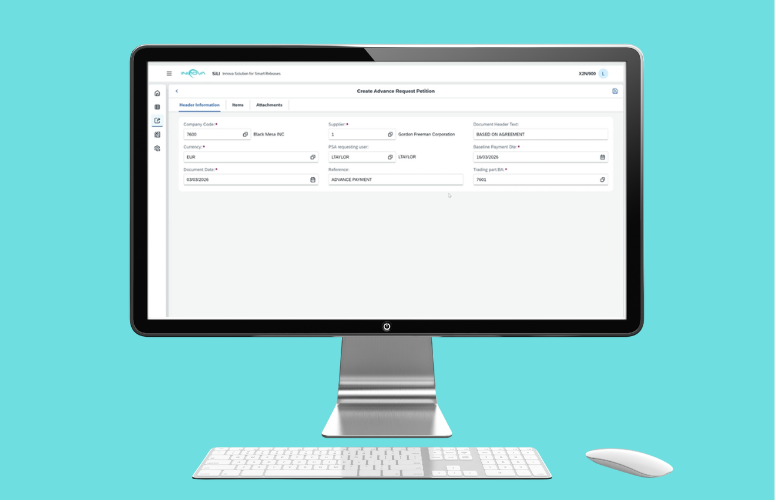
Management and approval of advance payment requests
Management and approval of advance payment requests SiLI USE CASE In standard SAP, the process of requesting and approving advances is usually manual, inflexible and highly dependent on mailings, external forms or custom developments. There is no clear concept of “down payment request” prior to the financial document, which forces to create requests directly in […]

Read more about solutions for SAP
English and Spanish. However, it can be translated into any language required by the client within approximately one week.
Yes. SiLI is already adapted to support SAP S/4HANA flexible approval strategies (Flexible Workflow), in addition to the classic SAP release strategies. It requires no modification of the standard: SiLI relies on the approval configuration you already have in SAP.
No, with the purchase of the application, any SAP user can use the application, according to the assigned permissions.
And for supplier access there are no limits or additional license fees.
SiLI is Innova’s application for approving SAP purchasing documents (requisitions, purchase orders, contracts, service entry sheets) from a mobile device, with valuable decision-making information: available budget, price and consumption history, and alerts. It removes bottlenecks caused by absent signers and blind approvals.
No, SiLI displays the information online and releases are executed in real time in SAP.
Yes, SiLI allows you to approve or reject documents directly with a button from your email, you only have to authenticate to validate your credentials and that’s it.
Yes, you can go to the “documents approved by me” query and select the documents you wish to reverse.
Purchase requisitions, purchase orders, contracts and service entry sheets. Approval of material reservations will be included soon.
No, SiLI uses exactly the standard SAP release strategy.
Architecture
SiLI has an ABAP component within SAP (ECC or S/4HANA), and a front-end component that can be deployed at your convenience in either of these options:
SaaS Architecture

Requirements: SAP ECC version 6.0 or higher, up to latest version of SAP S/4HANA. Site to site VPN configuration or SAP Webdispatcher. Possibility of web service publication from SAP ECC.
Option 2: On-Premise Architecture FES
Requirements: SAP ECC 6.0 up to the latest version of SAP S/4HANA. ABAP Backend Component (Installed via OT import) Possibility of web service publishing from SAP ECC or SAP S/4 Hana. FES (Front-end Server) and SSL certificate associated to the domain/server (only in case of On Premises installation).
Option 3: FIORI On-Premise Architecture

Requirements: SAP ECC version 6.0 or higher, up to latest version of SAP S/4HANA. ABAP Backend Component (Installed via OT import). SAP ERP – SAP Fiori communication via configured Gateway. Minimum component versions. SAP Fiori: SAP Gateway 740, SP 09 or higher (same in back-end [SAP ERP] and front-end [SAP Fiori]), SAP UI 754, SAP Fiori Front-End Server 6.0 or higher, SAPUI5 1.71
Option 4: On-Premise Architecture BTP

Requirements: SAP ECC 6.0 up to the latest version of SAP S/4HANA. ABAP Backend Component (Installed via OT import). Communication between SAP BTP and the SAP ERP server via cloud connector must be configured.
Complete list of functions
- Documents in scope (purchase requisitions, purchase orders, contracts, service entry sheets)
- Approval/rejection functions (Individual Mass Approval, by position - in case of purchase requisitions, Mass Rejection)
- Notification via mail (Notification of documents pending approval with relevant information sections of the application (according to user customization), Notification of document approval, Notification of document rejection, with reason for rejection).
- Reports (Release strategies set up in SAP Documents approved/rejected by me Documents without release strategy)
- Analysis information (header information, items, release status, communication history, header texts, item texts, general supplier information, service item detail, historical price analysis, material consumption and purchasing cycle analysis, document change log, contracts, historical purchase order overview, open item status, account assignment analysis and budget situation, coverage analysis and planning situation for materials, alert list)
- Reports (Activation/deactivation of e-mail notifications, Customization of fields to be displayed, Activation/deactivation of alert messages to be displayed, Sections of information to be displayed in e-mail)


