Goods receipt with barcode/QR scanning and photographic support

SiMA USE CASE

In standard SAP, goods receipt is often performed from SAP GUI or Fiori apps that require manual order and material lookup, and without a user experience designed for mobile devices and agile operation, making it difficult to operate in decentralized warehouse, loading dock or receiving environments. This leads to typing errors, increased operational time and dependence on fixed workstations.

Additionally, SAP does not natively offer a streamlined experience for capturing visual evidence and signatures upon receipt. Documentation of damage, shortages or supplier compliance is often done on paper or outside the system, which reduces traceability, complicates audits and weakens support for claims.

Do you identify with any of these cases?

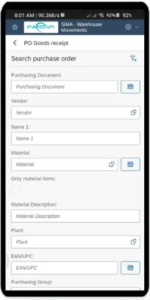
  • How can I perform a goods receipt in SAP directly from the dock or warehouse without using SAP GUI?
  • How to register a goods receipt by scanning a barcode, QR or EAN of the material or order?
  • How do I confirm that the material I am receiving is correct before posting the entry?
  • Can I attach photos as evidence of the condition of the goods received (damage, defects, packaging)?

  • Is it possible to capture the signature and name of the person delivering the goods as a backup?

  • Where are the attachments (photos and signatures) stored and how can I view them from SAP?

  • How to improve traceability and documentary support for supplier audits or claims?

Solution

SiMA – Warehouse Movements

Allows goods to be entered into SAP from any mobile device, optimizing the logistics operation and ensuring complete traceability from the point of receipt.

  • Enables goods receipts by scanning barcodes, QR or EAN, either from the purchase order, supplier’s label or material identification, eliminating the need for manual searches.
  • Displays information on the material to be received, facilitating operational validation and reducing receiving errors.
  • Allows you to attach images as support for the movement of goods, documenting the condition of the goods received, showing damage, defects or special conditions.
  • Includes the capture of the name and signature of the person delivering the merchandise, automatically generating the corresponding attachments (form with signature and images).
  • Attachments are linked to the goods receipt in SAP, maintaining the traceability of the process, while files can be stored in external document repositories such as Google Cloud, SharePoint or AWS S3.
  • Facilitates a paperless paperlessfaster and more reliable, directly from the place where the physical receipt occurs.

Do you identify with any of these cases?

Common SAP problems solved by SiTRACK

SAP mining best practices

SAP Best Practices for Mining: How to Prevent Stockouts and Protect Operational Continuity

Enjoy the Audio Version of the Article! Organizations often make the mistake of thinking that stockouts are exclusively a failure of planning algorithms. However, in our experience, the root of these shortages usually lies in the lack of alignment between actual field consumption, Master Data integrity, and the agility of procurement processes in geographically distributed […]

SAP food beverage

SAP in food and beverage: solutions to improve quality and traceability

Enjoy the Audio Version of the Article! Food and beverage companies operating with SAP manage particularly demanding environments: perishable products, strict batch control, traceability requirements, regulatory compliance and campaigns with highly concentrated activity peaks. Although SAP covers standard purchasing, logistics and finance processes, its performance in this sector depends directly on how data is governed […]

SAP automotive industry

SAP in the automotive industry: optimizing the supply chain

Enjoy the Audio Version of the Article! The automotive industry operates under extreme pressure in terms of precision, pace, and efficiency. The just-in-time model requires every component to arrive at the exact moment—neither earlier nor later: a single delay, a duplicated material code, or an approval that does not arrive on time can bring an […]

Read more about solutions for SAP

MRP Planning in SAP for Agribusiness: Stop Planning Your Next Campaign in Excel
SAP contractor management in construction: how to prevent project delays without leaving the ERP
SAP Best Practices for Mining: How to Prevent Stockouts and Protect Operational Continuity

Schedule your DEMO

Easy to know.

In 30 – 45 minutes we present you our solutions, online.
So you can see in detail how your processes will be optimized in SAP.

Request a Demo from Innova Apps